
Amazon’s new Amazon S3 Files release [1] is one of those launches that is easy to underestimate at first glance.
On the surface, the story sounds simple: S3 buckets can now be accessed as file systems. But for learners, architects, developers, and technical trainers, this is more than a convenience feature. It changes part of how we should think about the boundary between object storage and file systems on AWS. AWS says S3 Files provides "fully-featured, high-performance file system access" to data in Amazon S3, delivers full file system semantics, and is built using Amazon EFS.
That matters for builders.
It also matters for learners.
What Amazon S3 Files Actually Does
Amazon S3 Files provides a shared file system that connects AWS compute resources directly to data stored in Amazon S3. AWS says file-based applications, agents, and teams can work with S3 data through a file system interface without the data leaving S3. AWS also says S3 Files can be used from EC2, ECS, EKS, and Lambda, and that it supports NFS v4.1+ operations such as creating, reading, updating, and deleting files.
In practical terms, learners need to understand this clearly:
S3 Files does not magically turn S3 into a traditional file server in the old sense. It gives file-based access to S3-resident data while AWS handles synchronization between the file-system view and the bucket. AWS notes that file-system updates are reflected back to S3, and that bucket-side changes become visible in the file system on a different timing model.
That is a meaningful shift.
The First Learner Question: Is This a Cheaper Replacement for EBS?
A good learner will almost immediately ask a very practical question:
"If S3 can now be mounted as a file system, can I just use it instead of EBS because S3 is cheaper?"
That is exactly the kind of question a good AWS student should ask.
The answer is no.
Amazon EBS is still block storage. AWS describes it as storage volumes that attach to EC2 instances, on top of which you can create a file system, run a database, or use as block storage. That is a very different model from S3 Files. S3 Files is much more relevant to the "file vs. object" conversation than to the "block vs. object" conversation.
So this launch does not eliminate the need to understand EBS. It makes the storage decision more nuanced, not less.
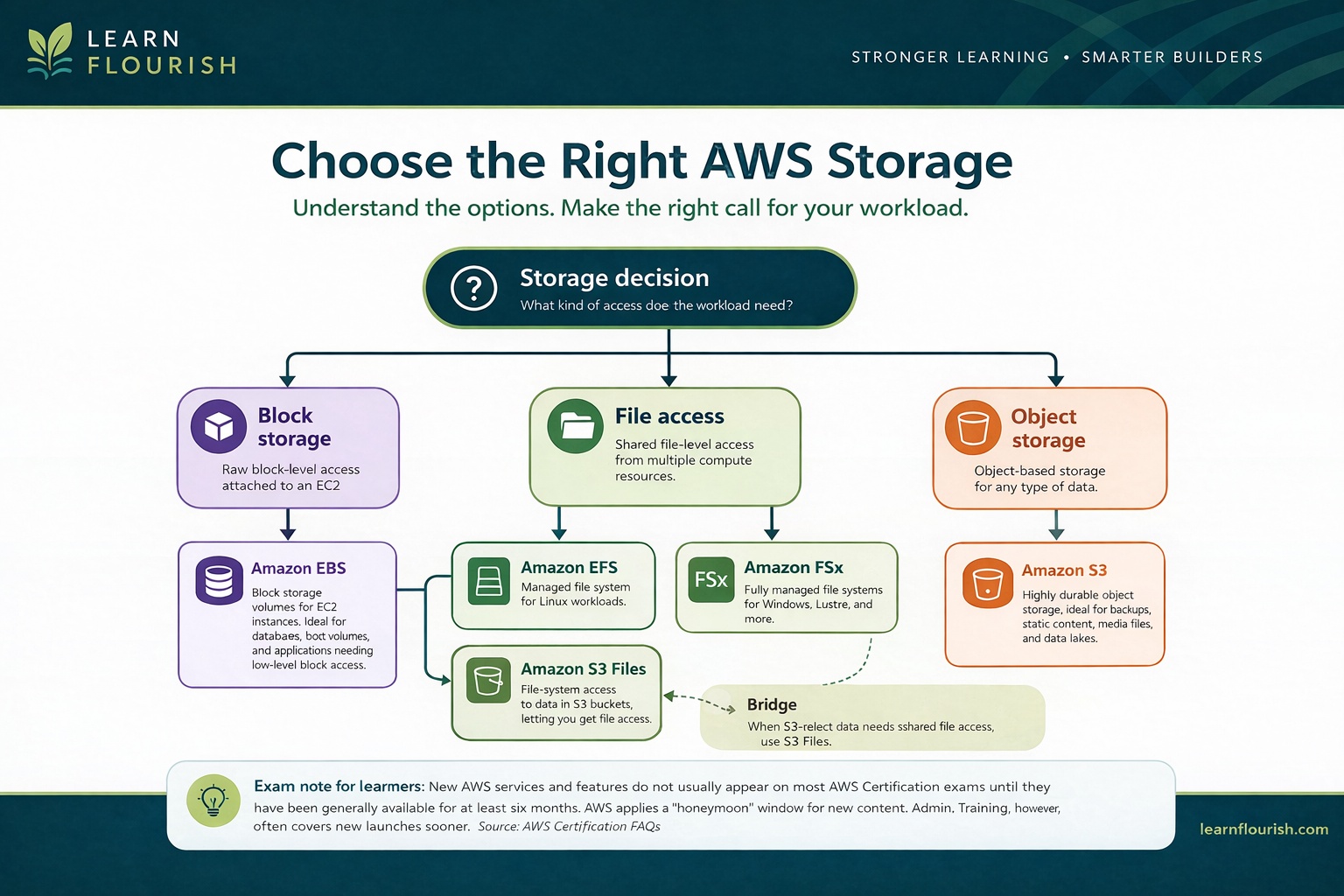
For learners, the better decision model now looks like this:
What kind of access does the workload need?"] A --> B["Block storage"] A --> C["File access"] A --> D["Object storage"] B --> E["Amazon EBS
Block storage attached to EC2"] C --> F["Amazon EFS"] C --> G["Amazon FSx"] C --> H["Amazon S3 Files
File-system access to S3-resident data"] D --> I["Amazon S3
Object storage"] I -. "Bridge when S3-resident data
needs shared file-system access" .-> H classDef decision fill:#142712,color:#e9d9ba,stroke:#4c311f,stroke-width:2px classDef category fill:#4c311f,color:#e9d9ba,stroke:#142712,stroke-width:1.5px classDef service fill:#e9d9ba,color:#142712,stroke:#4c311f,stroke-width:1.5px classDef bridge fill:#e9d9ba,color:#142712,stroke:#142712,stroke-width:2px class A decision class B,C,D category class E,F,G,I service class H bridge
That distinction matters because the real skill is not memorizing a launch. It is choosing the right storage model for the workload.
Why This Release Matters Educationally
From a teaching standpoint, S3 Files matters because it changes what learners should consider possible.
Before this launch, students often learned a fairly rigid pattern:
-
S3 for object storage
-
EFS or FSx for file access
-
duplication, movement, staging, or synchronization when file-based tools needed to work with S3-resident data
AWS is now explicitly positioning S3 Files as a way to reduce that friction by allowing shared, interactive, file-based access to S3 data while keeping the underlying data in S3.
That means the learning goal is no longer just "know the difference between object and file storage."
Now the learning goal is also:
-
know the difference
-
know when the difference still matters
-
know when S3 Files removes the need for a more complicated design
That is a much better standard.
What Learners Should Study Now
If I were updating a training path after this release, I would focus on five areas.
1. Storage Mental Models Still Matter
This launch does not erase the need to understand S3, EFS, FSx, and EBS as distinct services.
It increases the importance of understanding them correctly.
Students should still study:
-
S3 fundamentals
-
EBS fundamentals
-
EFS fundamentals
-
FSx families and their use cases
-
the tradeoffs among block, file, and object storage
What has changed is that S3 Files now becomes part of that decision tree.
2. How File Semantics Sit on Top of S3
This is one of the most important conceptual areas.
AWS says S3 Files presents S3 objects as files and directories and supports file operations through NFS semantics. AWS also notes that the synchronization timing between file-system updates and bucket-visible updates is not identical in both directions.
That means learners should study:
-
how file operations map to object storage behavior
-
what synchronization timing means operationally
-
what consistency expectations look like
-
how a "file system view of S3 data" differs from native block storage and native object access
This is exactly the kind of place where shallow memorization fails.
3. Security and Access Control
AWS says S3 Files integrates with IAM, supports identity and resource policies, uses TLS in transit, supports encryption at rest using AWS KMS keys (AWS owned keys by default or customer managed keys), and uses POSIX permissions for files and directories with permissions stored as object metadata.
That means learners should study the intersection of:
-
IAM policy design
-
S3 object permissions
-
KMS decisions
-
POSIX-style permissions
-
operational monitoring with CloudWatch and CloudTrail
This is a strong teaching opportunity because it forces learners to think across layers instead of staying inside one storage-service silo.
4. Compute Integration Patterns
AWS positions S3 Files as mountable from EC2, containers, and Lambda. That means this launch is a compute-integration topic as much as a storage topic.
Learners should now study questions like:
-
When should EC2 use S3 Files instead of direct S3 API access?
-
When do containerized workloads benefit from a file interface to S3 data?
-
What kinds of Lambda workflows become easier?
-
What changes for data-preparation and collaborative workflows?
Those are useful architectural questions.
5. When Not To Use It
This is one of the most important educator points.
A new AWS feature is not the same thing as a universal best practice.
Learners should practice asking:
-
Does this workload really need file semantics?
-
Is direct S3 access still the cleaner design?
-
Does the workload actually need block storage, which keeps this in EBS territory?
-
Does the workload need a specialized file system instead?
-
Is this solving a real problem or just adding novelty?
Those are the questions that distinguish a thoughtful builder from someone who only follows launch headlines.
How This Should Change Training
For educators and course designers, this launch should prompt a refresh in AWS storage instruction.
At minimum, I would update training in these ways:
-
add S3 Files to AWS storage comparison modules
-
explicitly compare S3 Files with EBS, EFS, FSx, and direct S3 access
-
revise object-versus-file explanations to include the new bridge model
-
add scenario questions about when to choose S3 Files
-
update labs where appropriate so students can mount and test it
-
teach the security model as a cross-service topic, not just a storage topic
This is not just a "mention it in passing" feature.
It changes the storage conversation enough that serious learners should study it deliberately.
Exam Note for Learners
Learners should also keep one practical certification point in mind.
AWS Certification states [2] that for the AWS Certified AI Practitioner, AWS Certified Machine Learning Engineer – Associate, AWS Certified Generative AI Developer – Professional, and AWS Certified Machine Learning – Specialty exams, a new product, service, or feature must be generally available for 3 months before it appears on the exam. For all other AWS Certification exams, a new product, service, or feature must be generally available for 6 months before it appears on a certification exam. AWS also says this guideline applies to certification exams, not training.
That means students should absolutely learn what S3 Files is now.
But they should not automatically assume it is already exam material for most AWS exams.
Training should move faster than exam blueprints.
What Strong Learners Should Be Able To Explain
If I were teaching this in class, I would expect a strong learner to be able to explain:
-
what S3 Files is
-
how it changes access to S3 data
-
how it differs from direct S3 object access
-
why it is not a replacement for EBS
-
how it compares conceptually with EFS and FSx
-
what kinds of workloads it improves
-
what its security model looks like at a high level
-
where it simplifies architecture and where it does not
That is the standard I would use.
Not "Can you recite the launch post?"
Can you explain what this changes, why it matters, and when to use it well?
Final Thought
The real educational value of Amazon S3 Files is not that it gives learners one more AWS feature to memorize.
It is that it forces a more mature understanding of storage design.
The old distinction between "S3 is object storage" and "file systems are something else" was useful, but it was never the whole story. S3 Files makes that especially clear by giving builders file-system access to S3-resident data while preserving the underlying strengths of S3.
For learners, the takeaway is simple: Study this feature.
But more importantly, study the storage decisions around it.
That is where the real expertise lives.
If you want training that helps learners move beyond launch headlines and into real technical judgment, that is exactly the kind of learning problem I care about at Learn Flourish.